光线追踪入门§
Step 1:输出PPM格式图片§
这里定义了Vector模板类,之后会独立出去,放入`template.hpp`中。接下来定义render方法来渲染PPM图片。 PPM图片格式很简单, ``` P6 width height 255 ``` 文件头十分易懂。 P6代表二进制输入, width代表图片宽度, height代表图片高度, 最后一个数字代表图像中允许的最大像素值,这里是255。 ``` RGBRGBRGB ``` 之后就按照每一行的每一列的像素,按顺序填入其RGB的值即可。 由于是二进制表示,需要转化成char,0 ~ 255代表一字节。 这样每一个像素颜色信息占据3字节。`<chrono>` 是 C++11 引入的时间库,提供了高精度的时间测量功能。其它部分中,我使用了现代CPP的一些用法,顺路学一下CPP ^_^。#include <fstream> #include <array> #include <string> #include <iostream> #include <iomanip> #include <chrono> #include <cmath> template <typename Type, size_t N> struct Vector { std::array<Type, N> v; Vector() : v() {} Vector(const std::array<Type, N> &v) : v(v) {} Type &operator[](const int i) { return v[i]; } const Type &operator[](const int i) const { return v[i]; } Vector<Type, N> operator+(const Vector<Type, N> &other) const { Vector<Type, N> res; for (int i = 0; i < N; i++) res[i] = v[i] + other[i]; return res; } Vector<Type, N> &operator+=(const Vector<Type, N> &other) { for (int i = 0; i < N; i++) v[i] += other[i]; return *this; } Vector<Type, N> operator-(const Vector<Type, N> &other) const { Vector<Type, N> res; for (int i = 0; i < N; i++) res[i] = v[i] - other[i]; return res; } Vector<Type, N> &operator-=(const Vector<Type, N> &other) { for (int i = 0; i < N; i++) v[i] -= other[i]; return *this; } Type operator*(const Vector<Type, N> &other) const { Type res = 0; for (int i = 0; i < N; i++) res += v[i] * other[i]; return res; } Vector<Type, N> operator*(const Type &scalar) const { Vector<Type, N> res; for (int i = 0; i < N; i++) res[i] = v[i] * scalar; return res; } Vector<Type, N> &operator*=(const Type &scalar) { for (int i = 0; i < N; i++) v[i] *= scalar; return *this; } Vector<Type, N> operator/(const Type &scalar) const { Vector<Type, N> res; for (int i = 0; i < N; i++) res[i] = v[i] / scalar; return res; } Vector<Type, N> &operator/=(const Type &scalar) { for (int i = 0; i < N; i++) v[i] /= scalar; return *this; } Vector<Type, 3> cross(const Vector<Type, 3> &other) const { static_assert(N == 3, "Cross product is only defined for 3D vectors."); Vector<Type, 3> res; res[0] = v[1] * other[2] - v[2] * other[1]; res[1] = v[2] * other[0] - v[0] * other[2]; res[2] = v[0] * other[1] - v[1] * other[0]; return res; } Type magnitude() const { Type res = 0; for (int i = 0; i < N; i++) res += v[i] * v[i]; return std::sqrt(res); } Vector<Type, N> normalized() const { return (*this) * (1.f / magnitude()); } friend std::ostream &operator<<(std::ostream &os, const Vector<Type, N> &vector) { os << "("; for (int i = 0; i < N - 1; ++i) os << vector.v[i] << ", "; os << vector.v[N - 1] << ")"; return os; } }; using v3f = Vector<float, 3>; void render(std::string filename, std::string filepath = "./", int width = 640, int height = 480) { std::ofstream ofs(filepath + filename + ".ppm", std::ios::binary); if (!ofs) { std::cerr << "Error opening file for writing!" << std::endl; return; } ofs << "P6\n" << width << " " << height << "\n255\n"; for (int j = 0; j < height; j++) { for (int i = 0; i < width; i++) { char r = static_cast<char>(i * 255 / width); char g = static_cast<char>(j * 255 / height); char b = static_cast<char>(128); ofs.write(&r, 1); ofs.write(&g, 1); ofs.write(&b, 1); } } } int main() { auto start = std::chrono::high_resolution_clock::now(); int width = 640, height = 480; render("image", "./", width, height); auto end = std::chrono::high_resolution_clock::now(); std::chrono::duration<double> duration = end - start; std::cout << "Time taken: " << duration.count() << " seconds" << std::endl; return 0; }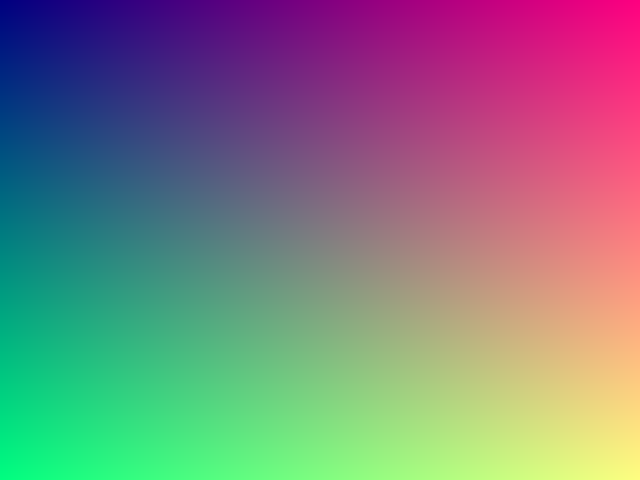
Step 2:定义基本结构体§
老样子,定义的这些结构体之后都会放到`template.hpp`中。``` using v3f = Vector<float, 3>; using Point = v3f; using Dir = v3f; using RGB = v3f; ``` 定义这些类型是为了让后面的代码可读性高一点,显然它们本质都一样。既然是3D渲染,我们自然要定义一些几何结构体。 ``` Flat Sphere ``` 平面,球体。基本上够3D渲染中的模型表示了。 ``` Ray Lights Camera Scenes ``` 光线,光源,相机,场景。这些也需要提前定义。 当然除了Ray以外Lights和Camera都存在Scenes中。剩下的新增代码,之后再解释 ^_^。#include <fstream> #include <array> #include <vector> #include <string> #include <iostream> #include <iomanip> #include <chrono> #include <cmath> #include "template.hpp" using v3f = Vector<float, 3>; using Point = v3f; using Dir = v3f; using RGB = v3f; struct Flat { std::vector<Point> points; Dir N; }; struct Sphere { Point center; float radius; }; struct Ray { Point origin; Dir direction; RGB color; float t; }; struct Light { Point position; float intensity; }; struct Camera { Point position; Dir direction; float dis, fov; }; struct Scenes { std::vector<Flat> flats; std::vector<Sphere> spheres; std::vector<Light> lights; Camera camera; }; RGB ray_tracing(Ray &ray, const Scenes &scenes, int depth) { RGB color({0., 1., 1.}); return color; } void render(Scenes &scenes, std::string filename, int width, int height, std::string filepath = "./") { std::ofstream ofs(filepath + filename + ".ppm", std::ios::binary); if (!ofs) { std::cerr << "Error opening file for writing!" << std::endl; return; } ofs << "P6\n" << width << " " << height << "\n255\n"; Camera camera = scenes.camera; for (int j = 0; j < height; j++) { for (int i = 0; i < width; i++) { Ray ray; ray.origin = camera.position; RGB rgb = ray_tracing(ray, scenes, 0); float max = std::max(rgb[0], std::max(rgb[1], rgb[2])); rgb /= max; char r = static_cast<char>(rgb[0] * 255); char g = static_cast<char>(rgb[1] * 255); char b = static_cast<char>(rgb[2] * 255); ofs.write(&r, 1); ofs.write(&g, 1); ofs.write(&b, 1); } } } int main() { auto start = std::chrono::high_resolution_clock::now(); int width = 640, height = 480; Scenes scenes; render(scenes, "image", width, height, "./"); auto end = std::chrono::high_resolution_clock::now(); std::chrono::duration<double> duration = end - start; std::cout << "Time taken: " << duration.count() << " seconds" << std::endl; return 0; }
Step 3:简单的光线追踪§
对于结构体Sphere新添加一个成员函数`ray_intersect`来判断是否和某个射线相交,同时更新最短相交距离,`更新最短相交距离`这个之后会用到。我并没有对`ray_tracing`函数进行太多更改,只是根据射线是否与物体相交来返回不同颜色。`#pragma omp parallel for` 用于在多核 CPU 上并行执行循环体内的代码,从而加速计算密集型任务。 由于光线追踪每个像素的渲染都是独立的,我们可以采取并行编程来优化。 刚开始循环内开销并不大,反而会造成负面效果,补充代码后应该有显著提升。 之后会进行测试。 记得在编译时加入`-fopenmp`参数。 `g++ -fopenmp -O1 -O2 -O3 -std=c++20` 由于渲染像素我们是并行运行的,每个像素渲染完成后的先后顺序不可控,我们会把对应位置的RGB存下来,之后一起顺序写入。 为了更便于理解代码结构,我更改了部分代码。新增了`write`函数,之后会放入我们的`template.hpp`中。更改代码的最重要的部分是求解摄像机对各个像素打出的射线的方向。在这之前我想我需要解释为什么要这么做,`光线追踪`顾名思义,就是模拟光线在现实世界的行为,类比人眼,摄影机捕获的画面自然是光源发出的光线,经过重重反射,折射,漫反射等等物理行为,最终打入摄像机所得到的。 当然如果模拟光源发出光的行为显然是一种很麻烦的方式,光源打出的各种光有很多并不会被摄像机捕获,哪怕你把摄像机所监视的画布扩大,这里的画布可以简单联想为渲染的画面,也是会有很严重的计算冗余。 但是我们知道光路是可逆的,如果我们找到摄像机对于画布上的每个像素点的方向向量,我们自然也知道这个条具体的光线的方向向量。 现在我们可以反其道而行之,从摄像机对画布上的每个像素打一条射线,根据这条射线我们就可以追踪真正的光线的物理行为,这就叫做`光线追踪`。 我们甚至可以模拟光线反射和折射等行为,当然此时我们打过来的这条射线原本所代表的光路就是对应的反射光线或折射光线。 刚开始我们并不会考虑反射,折射以及漫反射,也就是说我们只进行最简单的一步,就是从摄像机对物体打出一条射线,并直接求出颜色。 因此这一步其实应该叫做ray_casting即`射线投射`。这是光线追踪的第一步。前面我们提到了摄像机,画布,光源。 接下来我们会给出其具体关系图。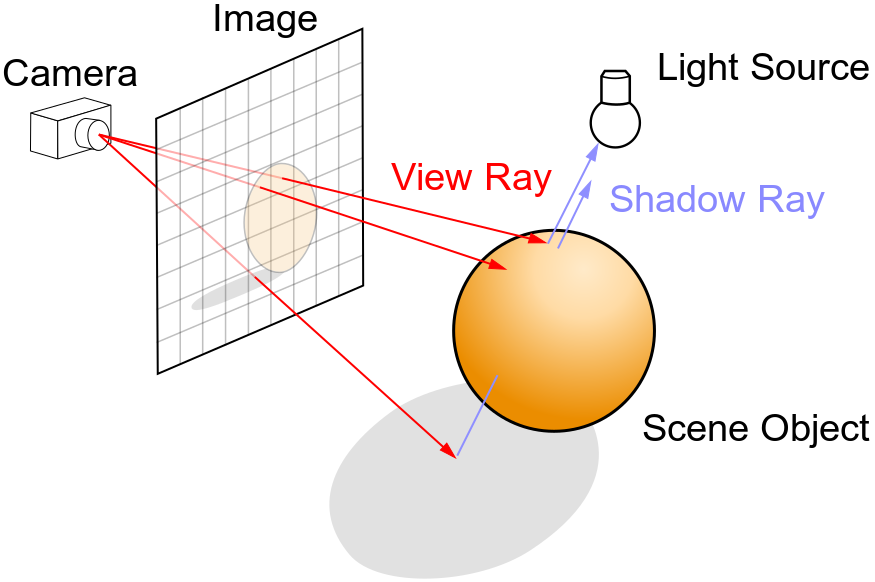 现在可以解释如何求解摄像机对各个像素打出的射线方向了。 为了简化计算和更容易理解,统一世界坐标系为右手坐标系,摄像机固定在原点,视角朝向默认向z轴负半轴方向,摄像机到画布距离固定为1。 接下来我们的任务就是计算打向某个像素点,该像素点在画布的坐标。 `float x = (2. * (i + 0.5) / (float)width - 1) * tan(camera.fov / 2.);` `(i + 0.5)`算出该像素的中心点, `(i + 0.5) / (float)width`求得该像素横坐标占总宽度百分比, `2. * (i + 0.5) / (float)width * tan(camera.fov / 2.)`算出在世界度量尺度下该像素在画布上的横坐标。 `- tan(camera.fov / 2.)`减去半个画布宽是为了我们让画布的正中心正对摄像机。 综上我们得到了某个像素的世界坐标系下的横坐标,同样过程求纵坐标即可。 值得注意的是,fov代表着视线的水平观察角度,所以对于求得的纵坐标还需要`* (float)height / (float)width`处理。 纵向的渲染顺序是按照纵坐标递减顺序渲染,和横向相反,所以纵坐标求解需要加上负号上下翻转图像。至此,我们已经实现了光线追踪的第一步`Ray Casting`。struct Sphere { Point center; float radius; bool ray_intersect(Ray &ray) const { v3f L = center - ray.origin; float tca = L * ray.direction; float d2 = L * L - tca * tca; if (d2 > radius * radius) return false; float thc = sqrtf(radius * radius - d2); float t = ray.t; ray.t = tca - thc; float t1 = tca + thc; if (ray.t < 0) ray.t = t1; if (ray.t < 0) { ray.t = t; return false; } return true; } };#include <fstream> #include <array> #include <vector> #include <string> #include <iostream> #include <iomanip> #include <chrono> #include <limits> #include <cmath> #include <omp.h> #include "template.hpp" constexpr float MAX_FLOAT = std::numeric_limits<float>::max(); const float PI = 4. * std::atan(1.0); RGB ray_tracing(Ray &ray, const Scenes &scenes, int depth) { RGB color({0., 1., 1.}); for (auto &sphere : scenes.spheres) { if (sphere.ray_intersect(ray)) { color = RGB({1., 1., 0.}); } } return color; } std::vector<std::vector<RGB>> render(Scenes &scenes, int width, int height) { Camera camera = scenes.camera; std::vector<std::vector<RGB>> image(height, std::vector<RGB>(width)); #pragma omp parallel for for (size_t j = 0; j < height; ++j) { for (size_t i = 0; i < width; ++i) { float x = (2. * (i + 0.5) / (float)width - 1) * tan(camera.fov / 2.); float y = -(2. * (j + 0.5) / (float)height - 1) * tan(camera.fov / 2.) * (float)height / (float)width; Dir dir = v3f({x, y, -1}).normalized(); Ray ray({camera.position, dir, RGB({0., 1., 1.}), MAX_FLOAT}); RGB rgb = ray_tracing(ray, scenes, 0); float max = std::max(rgb[0], std::max(rgb[1], rgb[2])); rgb /= max; image[j][i] = rgb; } } return image; } void write(const std::vector<std::vector<RGB>> &image, const std::string &filename, const std::string &filepath = "./") { int width = image[0].size(), height = image.size(); std::ofstream ofs(filepath + filename + ".ppm", std::ios::binary); if (!ofs) { std::cerr << "Error opening file for writing!" << std::endl; return; } ofs << "P6\n" << width << " " << height << "\n255\n"; for (size_t j = 0; j < height; ++j) { for (size_t i = 0; i < width; ++i) { RGB rgb = image[j][i]; char r = static_cast<char>(rgb[0] * 255); char g = static_cast<char>(rgb[1] * 255); char b = static_cast<char>(rgb[2] * 255); ofs.write(&r, 1); ofs.write(&g, 1); ofs.write(&b, 1); } } } int main() { auto start = std::chrono::high_resolution_clock::now(); int width = 640, height = 480; std::vector<Sphere> spheres; spheres.push_back(Sphere({Point({0., 0., -5.}), 2.})); Camera camera({Point({0., 0., 0.}), Dir({0., 0., 1.}), 1., static_cast<float>(105. / 180 * PI)}); Scenes scenes; scenes.spheres = spheres; scenes.camera = camera; auto image = render(scenes, width, height); write(image, "image", "./"); auto end = std::chrono::high_resolution_clock::now(); std::chrono::duration<double> duration = end - start; std::cout << "Time taken: " << duration.count() << " seconds" << std::endl; return 0; }
现在可以解释如何求解摄像机对各个像素打出的射线方向了。
为了简化计算和更容易理解,统一世界坐标系为右手坐标系,摄像机固定在原点,视角朝向默认向z轴负半轴方向,摄像机到画布距离固定为1。
接下来我们的任务就是计算打向某个像素点,该像素点在画布的坐标。
`float x = (2. * (i + 0.5) / (float)width - 1) * tan(camera.fov / 2.);`
`(i + 0.5)`算出该像素的中心点,
`(i + 0.5) / (float)width`求得该像素横坐标占总宽度百分比,
`2. * (i + 0.5) / (float)width * tan(camera.fov / 2.)`算出在世界度量尺度下该像素在画布上的横坐标。
`- tan(camera.fov / 2.)`减去半个画布宽是为了我们让画布的正中心正对摄像机。
综上我们得到了某个像素的世界坐标系下的横坐标,同样过程求纵坐标即可。
值得注意的是,fov代表着视线的水平观察角度,所以对于求得的纵坐标还需要`* (float)height / (float)width`处理。
纵向的渲染顺序是按照纵坐标递减顺序渲染,和横向相反,所以纵坐标求解需要加上负号上下翻转图像。
至此,我们已经实现了光线追踪的第一步`Ray Casting`。struct Sphere { Point center; float radius; bool ray_intersect(Ray &ray) const { v3f L = center - ray.origin; float tca = L * ray.direction; float d2 = L * L - tca * tca; if (d2 > radius * radius) return false; float thc = sqrtf(radius * radius - d2); float t = ray.t; ray.t = tca - thc; float t1 = tca + thc; if (ray.t < 0) ray.t = t1; if (ray.t < 0) { ray.t = t; return false; } return true; } };#include <fstream> #include <array> #include <vector> #include <string> #include <iostream> #include <iomanip> #include <chrono> #include <limits> #include <cmath> #include <omp.h> #include "template.hpp" constexpr float MAX_FLOAT = std::numeric_limits<float>::max(); const float PI = 4. * std::atan(1.0); RGB ray_tracing(Ray &ray, const Scenes &scenes, int depth) { RGB color({0., 1., 1.}); for (auto &sphere : scenes.spheres) { if (sphere.ray_intersect(ray)) { color = RGB({1., 1., 0.}); } } return color; } std::vector<std::vector<RGB>> render(Scenes &scenes, int width, int height) { Camera camera = scenes.camera; std::vector<std::vector<RGB>> image(height, std::vector<RGB>(width)); #pragma omp parallel for for (size_t j = 0; j < height; ++j) { for (size_t i = 0; i < width; ++i) { float x = (2. * (i + 0.5) / (float)width - 1) * tan(camera.fov / 2.); float y = -(2. * (j + 0.5) / (float)height - 1) * tan(camera.fov / 2.) * (float)height / (float)width; Dir dir = v3f({x, y, -1}).normalized(); Ray ray({camera.position, dir, RGB({0., 1., 1.}), MAX_FLOAT}); RGB rgb = ray_tracing(ray, scenes, 0); float max = std::max(rgb[0], std::max(rgb[1], rgb[2])); rgb /= max; image[j][i] = rgb; } } return image; } void write(const std::vector<std::vector<RGB>> &image, const std::string &filename, const std::string &filepath = "./") { int width = image[0].size(), height = image.size(); std::ofstream ofs(filepath + filename + ".ppm", std::ios::binary); if (!ofs) { std::cerr << "Error opening file for writing!" << std::endl; return; } ofs << "P6\n" << width << " " << height << "\n255\n"; for (size_t j = 0; j < height; ++j) { for (size_t i = 0; i < width; ++i) { RGB rgb = image[j][i]; char r = static_cast<char>(rgb[0] * 255); char g = static_cast<char>(rgb[1] * 255); char b = static_cast<char>(rgb[2] * 255); ofs.write(&r, 1); ofs.write(&g, 1); ofs.write(&b, 1); } } } int main() { auto start = std::chrono::high_resolution_clock::now(); int width = 640, height = 480; std::vector<Sphere> spheres; spheres.push_back(Sphere({Point({0., 0., -5.}), 2.})); Camera camera({Point({0., 0., 0.}), Dir({0., 0., 1.}), 1., static_cast<float>(105. / 180 * PI)}); Scenes scenes; scenes.spheres = spheres; scenes.camera = camera; auto image = render(scenes, width, height); write(image, "image", "./"); auto end = std::chrono::high_resolution_clock::now(); std::chrono::duration<double> duration = end - start; std::cout << "Time taken: " << duration.count() << " seconds" << std::endl; return 0; }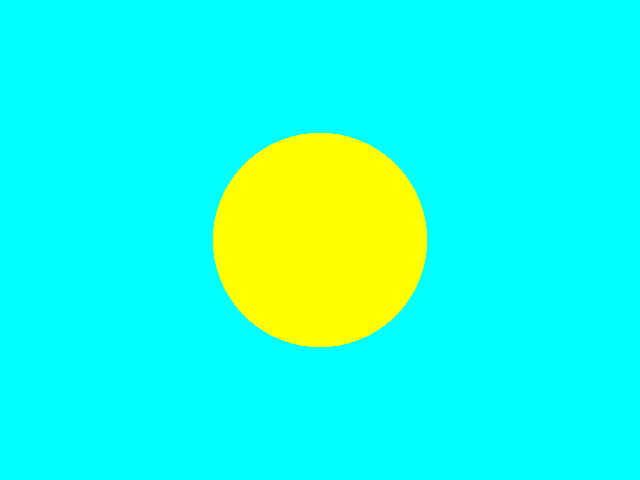
Step 4:添加环境光§
这次我更改了不少的代码,并且发现了之前代码的一个小错误。
```
float max = std::max(rgb[0], std::max(rgb[1], rgb[2]));
if (max > 1)
    rgb /= max;
```
这部分代码我添加了`if (max > 1)`,因为我不想让RGB未超过1的颜色强制除以max。
我让rgb除max的原因仅仅是当max大于1时,意味着其比最大亮度还要亮,显然这在自然界中是不存在的。
因此当max大于1时,可以认为这个是最大的亮度,需要rgb除max,使得最大值为1。
不要对RGB范围是0到1感到迷惑,渲染画面的时候我们会乘上255转化为真正的RGB格式。
好了,该到了讨论环境光的部分了。在往前的代码中我并没有设置光源,所以可以简单认为摄像机投射的视线本身就是光线,并且射线直接打在物体上,强度没有损耗,显现出物体本色。 而在后续代码中,我设置了光源,毕竟我们不能从摄像机发光了,这只是一种取巧的做法,现实世界人眼可不会发光^_^。 那么问题来了,光线追踪到物体上和物体产生交点,怎么得到这个点的颜色呢? 事实上,我们会计算该点的照明度乘上它的本色RGB,交点的照明度应该和交点的法线与交点和光源方向向量的夹角有关。 夹角越小自然照明度越好,那么问题其实很好解决,只需要求出法线以及交点和光源转化为单位向量后的点积就可以近似得到亮度。 当然,我们还会乘上一些系数,这是为了尽量拟合真实世界而设置的。翻译一下英文,自行理解语义即可。 对于多个光源,把它们贡献加一块就可以了,不用在意RGB会大于1,我们前面已经解决过了,也不用在意是否现实世界就是这样运算的,我们是尽可能按照现实世界的物理法则,但对于一些复杂部分,简化一下,拟合拟合就行,毕竟现实世界真的很复杂。由于更改代码较多,涉及到`template.hpp`,我将展示所有代码。constexpr float MAX_FLOAT = std::numeric_limits<float>::max(); const float PI = 4. * std::atan(1.0); template <typename Type, size_t N> struct Vector { std::array<Type, N> v; Vector() : v() {} Vector(const std::array<Type, N> &v) : v(v) {} Type &operator[](const int i) { return v[i]; } const Type &operator[](const int i) const { return v[i]; } Vector<Type, N> operator+(const Vector<Type, N> &other) const { Vector<Type, N> res; for (int i = 0; i < N; i++) res[i] = v[i] + other[i]; return res; } Vector<Type, N> &operator+=(const Vector<Type, N> &other) { for (int i = 0; i < N; i++) v[i] += other[i]; return *this; } Vector<Type, N> operator-(const Vector<Type, N> &other) const { Vector<Type, N> res; for (int i = 0; i < N; i++) res[i] = v[i] - other[i]; return res; } Vector<Type, N> &operator-=(const Vector<Type, N> &other) { for (int i = 0; i < N; i++) v[i] -= other[i]; return *this; } Type operator*(const Vector<Type, N> &other) const { Type res = 0; for (int i = 0; i < N; i++) res += v[i] * other[i]; return res; } Vector<Type, N> operator*(const Type &scalar) const { Vector<Type, N> res; for (int i = 0; i < N; i++) res[i] = v[i] * scalar; return res; } Vector<Type, N> &operator*=(const Type &scalar) { for (int i = 0; i < N; i++) v[i] *= scalar; return *this; } Vector<Type, N> operator/(const Type &scalar) const { Vector<Type, N> res; for (int i = 0; i < N; i++) res[i] = v[i] / scalar; return res; } Vector<Type, N> &operator/=(const Type &scalar) { for (int i = 0; i < N; i++) v[i] /= scalar; return *this; } Vector<Type, 3> cross(const Vector<Type, 3> &other) const { static_assert(N == 3, "Cross product is only defined for 3D vectors."); Vector<Type, 3> res; res[0] = v[1] * other[2] - v[2] * other[1]; res[1] = v[2] * other[0] - v[0] * other[2]; res[2] = v[0] * other[1] - v[1] * other[0]; return res; } Type magnitude() const { Type res = 0; for (int i = 0; i < N; i++) res += v[i] * v[i]; return std::sqrt(res); } Vector<Type, N> normalized() const { return (*this) * (1.f / magnitude()); } friend std::ostream &operator<<(std::ostream &os, const Vector<Type, N> &vector) { os << "("; for (int i = 0; i < N - 1; ++i) os << vector.v[i] << ", "; os << vector.v[N - 1] << ")"; return os; } }; using v3f = Vector<float, 3>; using Point = v3f; using Dir = v3f; using RGB = v3f; struct Ray { Point origin; Dir direction; RGB color; float t; }; struct Flat { std::vector<Point> points; Dir N; }; struct Sphere { Point center; float radius; bool ray_intersect(Ray &ray) const { v3f L = center - ray.origin; float tca = L * ray.direction; float d2 = L * L - tca * tca; if (d2 > radius * radius) return false; float thc = sqrtf(radius * radius - d2); float t = ray.t; ray.t = tca - thc; float t1 = tca + thc; if (ray.t < 0) ray.t = t1; if (ray.t < 0) { ray.t = t; return false; } return true; } }; struct Light { Point position; float intensity; }; struct Camera { Point position; Dir direction; float dis, fov; }; struct Scenes { std::vector<Flat> flats; std::vector<Sphere> spheres; std::vector<Light> lights; Camera camera; }; void write(const std::vector<std::vector<RGB>> &image, const std::string &filename, const std::string &filepath = "./") { int width = image[0].size(), height = image.size(); std::ofstream ofs(filepath + filename + ".ppm", std::ios::binary); if (!ofs) { std::cerr << "Error opening file for writing!" << std::endl; return; } ofs << "P6\n" << width << " " << height << "\n255\n"; for (size_t j = 0; j < height; ++j) { for (size_t i = 0; i < width; ++i) { RGB rgb = image[j][i]; char r = static_cast<char>(rgb[0] * 255); char g = static_cast<char>(rgb[1] * 255); char b = static_cast<char>(rgb[2] * 255); ofs.write(&r, 1); ofs.write(&g, 1); ofs.write(&b, 1); } } } RGB ray_tracing(Ray &ray, const Scenes &scenes, int depth); std::vector<std::vector<RGB>> render(Scenes &scenes, int width, int height) { Camera camera = scenes.camera; std::vector<std::vector<RGB>> image(height, std::vector<RGB>(width)); #pragma omp parallel for for (size_t j = 0; j < height; ++j) { for (size_t i = 0; i < width; ++i) { float x = (2. * (i + 0.5) / (float)width - 1) * tan(camera.fov / 2.); float y = -(2. * (j + 0.5) / (float)height - 1) * tan(camera.fov / 2.) * (float)height / (float)width; Dir dir = v3f({x, y, -1}).normalized(); Ray ray({camera.position, dir, RGB({0., 1., 1.}), MAX_FLOAT}); RGB rgb = ray_tracing(ray, scenes, 0); float max = std::max(rgb[0], std::max(rgb[1], rgb[2])); if (max > 1) rgb /= max; image[j][i] = rgb; } } return image; }#include <fstream> #include <array> #include <vector> #include <string> #include <iostream> #include <iomanip> #include <chrono> #include <limits> #include <cmath> #include <omp.h> #include "template.hpp" RGB ray_tracing(Ray &ray, const Scenes &scenes, int depth) { bool intersect = false; RGB color({1., 1., 0.}); Dir N; Point hit_point; for (auto &sphere : scenes.spheres) { if (sphere.ray_intersect(ray)) { intersect = true; hit_point = ray.origin + ray.direction.normalized() * ray.t; N = (hit_point - sphere.center).normalized(); } } float diffuse_light_intensity = 0.; for (auto light : scenes.lights) { Dir light_dir = (light.position - hit_point).normalized(); diffuse_light_intensity += light.intensity * std::max(0.f, light_dir * N); } return intersect ? color * diffuse_light_intensity : RGB({0., 1., 1.}); } int main() { auto start = std::chrono::high_resolution_clock::now(); int width = 640, height = 480; std::vector<Sphere> spheres; spheres.push_back(Sphere({Point({0., 0., -5.}), 2.})); std::vector<Light> lights; lights.push_back(Light({Point({0., 0., 0.}), 1.})); Camera camera({Point({0., 0., 0.}), Dir({0., 0., 1.}), 1., static_cast<float>(105. / 180 * PI)}); Scenes scenes; scenes.spheres = spheres; scenes.lights = lights; scenes.camera = camera; auto image = render(scenes, width, height); write(image, "image", "./"); auto end = std::chrono::high_resolution_clock::now(); std::chrono::duration<double> duration = end - start; std::cout << "Time taken: " << duration.count() << " seconds" << std::endl; return 0; }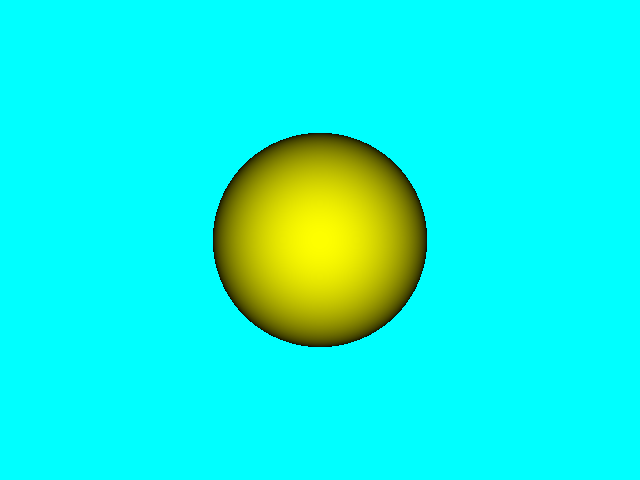
Step 5:Phong模型§
Phong模型认为物体表面反射光线由三部分组成: ``` 环境光(Ambient):场景中的其他间接光照 漫反射(Diffuse):散射部分(大但不光亮) 高光反射(Specular):镜面反射部分(小而亮) ```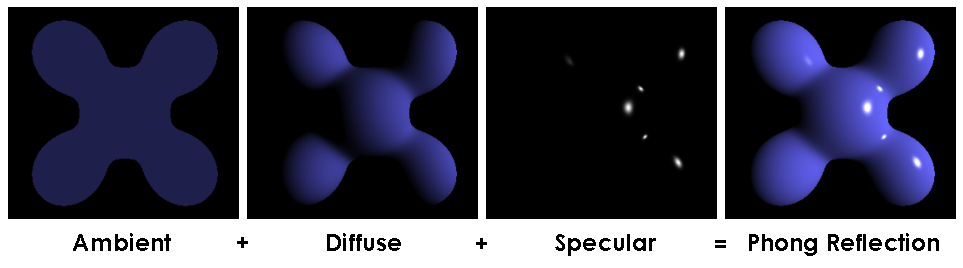 在这里我们需要引入一些基础的数学推导。
平面法线计算\[\vec{n} = (P_1 - P_0) \times (P_2 - P_0)\]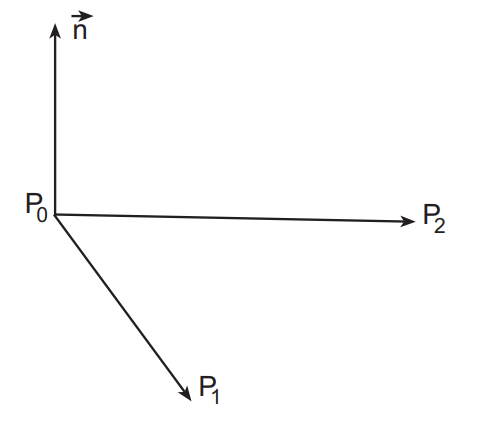
反射向量计算\[ \begin{align}\begin{aligned}\vec{n}' = (\frac{(\vec{n} \cdot \vec{l})}{\vec{n}^2})\vec{n}\\\vec{u} = \vec{n}' - \vec{l}\\\vec{r} = \vec{l} + 2 \vec{u} = \vec{l} + 2 (\vec{n}' - \vec{l}) = 2 (\vec{n} \cdot \vec{l}) \vec{n} - \vec{l}\end{aligned}\end{align} \]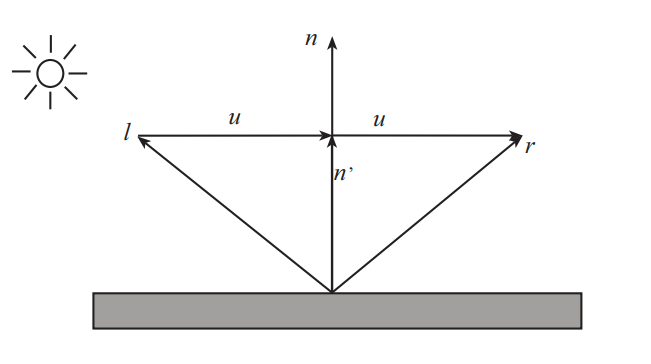
半角向量计算\[H = \frac{L + V}{\|L + V\|}\]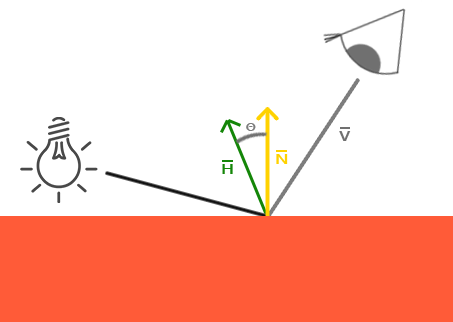 下面是我们Phong模型最重要的部分了。光照最终结果=环境光照+漫反射光照+镜面反射光照 ``` 法向量(Normal vector):n 视口向量(View vector):v 光源向量(Light vector):l 反射向量(Reflection vector):r ```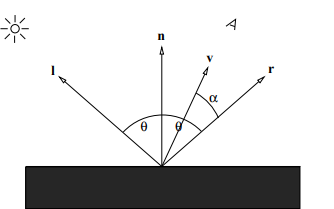
环境光Ambient\[0 \leq k_a \leq 1\]\[I_a = k_a L_a\]环境光ambient = 环境光反射系数 * 环境光光照强度漫反射Diffuse\[I_d = k_d \max(0, \vec{n} \cdot \vec{l}) L_d\]\[0 \leq k_d \leq 1\]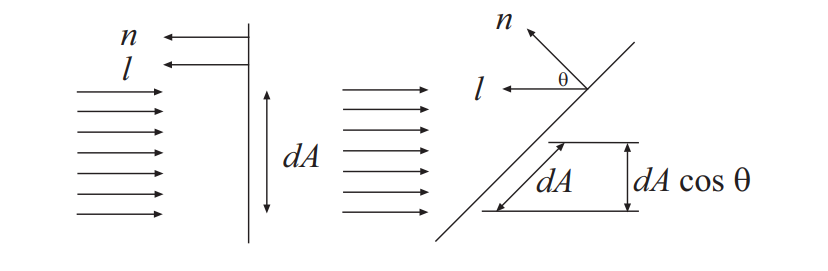
高光反射Specular\[I_s = k_s (\vec{r} \cdot \vec{v})^s L_s\]Phong模型计算方程\[I = I_a + I_d + I_s = k_a L_a + k_d \max(0, \vec{n} \cdot \vec{l}) L_d + k_s (\vec{r} \cdot \vec{v})^s L_s\]Blinn-Phong光照模型 ``` Blinn-Phong光照模型在物理上的正确性不必Phong高,但计算效率提高了很多。当观察向量与反射向量越接近,那么半角向量与法向量N越接近,观察者看到的镜面光成分越强。 ```Blinn-Phong光照模型计算方程\[I = I_a + I_d + I_s = k_a L_a + k_d \max(0, \vec{n} \cdot \vec{l}) L_d + k_s (\vec{n} \cdot \vec{h})^s L_s\]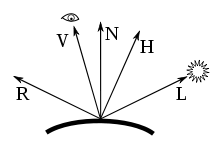 公式比较多,我们只需要记住最重要的点就行了。 `光照最终结果=环境光照+漫反射光照+镜面反射光照` 至于怎么计算的,看代码就行。到这一步,我们就已经掌握所有关键点了。 接下来,我们就要开始加速了。 不懂的同学一定要在互联网上搜索一下,我这里并没有详细的解释和证明,因为我相信别人讲的比我更好。 我可不想当大自然的搬运工。
公式比较多,我们只需要记住最重要的点就行了。
`光照最终结果=环境光照+漫反射光照+镜面反射光照`
至于怎么计算的,看代码就行。
到这一步,我们就已经掌握所有关键点了。 接下来,我们就要开始加速了。 不懂的同学一定要在互联网上搜索一下,我这里并没有详细的解释和证明,因为我相信别人讲的比我更好。 我可不想当大自然的搬运工。
Step 6:漫反射光照+镜面反射光照§
初具成效是吧。
现在我们已经有了哑光和高光即漫反射和镜面反射,画面看起来已经很有3D的感觉了。
在下方代码中,我添加了求反射向量的函数,并且把计算射线和物体相交的部分拆分出来打包成独立函数。 由于这两个函数之后基本不怎么改变,我们会都放入`template.hpp`中。 特别的,我还进行了一点小小更改,如果一个物体和射线相交但是相加距离过远,我们认为没有相交。 毕竟太远的物体对我们渲染某个像素可能会有负面影响。十万八千里外的物体在你的视线中占据一个最小的像素,想想都不可能吧。除非你画布足够大,那个小像素可以对应这个物体,否则会造成失真哦。#include <fstream> #include <array> #include <vector> #include <string> #include <iostream> #include <iomanip> #include <chrono> #include <limits> #include <cmath> #include <omp.h> #include "template.hpp" Dir reflect(const Dir &L, const Dir &N) { return N * 2.f * (L * N) - L; } bool scenes_intersect(Ray &ray, const Scenes &scenes, Point &hit_point, Dir &N) { bool intersect = false; for (auto &sphere : scenes.spheres) { if (sphere.ray_intersect(ray)) { intersect = true; hit_point = ray.origin + ray.direction.normalized() * ray.t; N = (hit_point - sphere.center).normalized(); } } return intersect && ray.t < 1000.; } RGB ray_tracing(Ray &ray, const Scenes &scenes, int depth) { RGB color({1., 1., 0.}); Point hit_point; Dir N; if (!scenes_intersect(ray, scenes, hit_point, N)) { return RGB({0., 1., 1.}); } float diffuse_light_intensity = 0., specular_light_intensity = 0.; for (auto light : scenes.lights) { Dir light_dir = (light.position - hit_point).normalized(); diffuse_light_intensity += light.intensity * std::max(0.f, light_dir * N); specular_light_intensity += light.intensity * powf(std::max(0.f, reflect(light_dir, N) * (-ray.direction)), 10); } return color * diffuse_light_intensity + RGB({1., 1., 1.}) * specular_light_intensity; } int main() { auto start = std::chrono::high_resolution_clock::now(); int width = 640, height = 480; std::vector<Sphere> spheres; spheres.push_back(Sphere({Point({0., 0., -5.}), 2.})); std::vector<Light> lights; lights.push_back(Light({Point({0., 0., 0.}), 1.})); Camera camera({Point({0., 0., 0.}), Dir({0., 0., 1.}), 1., static_cast<float>(105. / 180 * PI)}); Scenes scenes; scenes.spheres = spheres; scenes.lights = lights; scenes.camera = camera; auto image = render(scenes, width, height); write(image, "image", "./"); auto end = std::chrono::high_resolution_clock::now(); std::chrono::duration<double> duration = end - start; std::cout << "Time taken: " << duration.count() << " seconds" << std::endl; return 0; }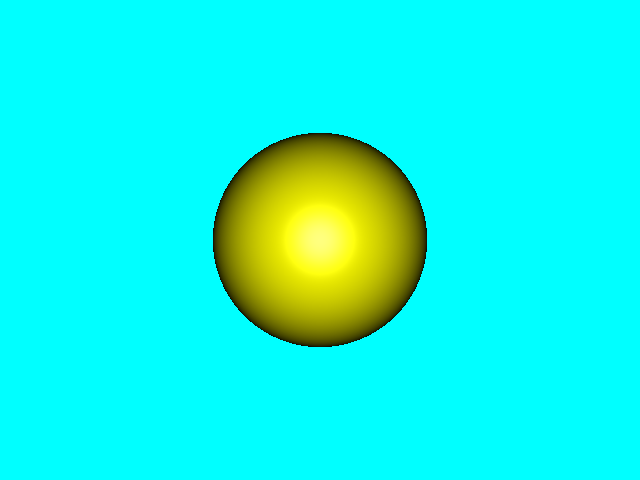
Step 7:阴影§
我仅仅添加了几行代码就实现阴影功能。
只需要在对每个光源进行运算时看一看中间是否有遮挡物就可以了,有就不计算它的贡献。
判断相交与否可以复用`scenes_intersect`函数,值得注意的是,我们传入的射线的起始点是交点往法线方向加一些偏移量。
否则射线肯定会和交点自身所在物体相交,这就没有意义了。
#include <fstream> #include <array> #include <vector> #include <string> #include <iostream> #include <iomanip> #include <chrono> #include <limits> #include <cmath> #include <omp.h> #include "template.hpp" RGB ray_tracing(Ray &ray, const Scenes &scenes, int depth) { RGB color({1., 1., 0.}); Point hit_point; Dir N; if (!scenes_intersect(ray, scenes, hit_point, N)) { return RGB({0., 1., 1.}); } float diffuse_light_intensity = 0., specular_light_intensity = 0.; for (auto light : scenes.lights) { Dir light_dir = (light.position - hit_point).normalized(); Ray shadow_ray({(light_dir * N < 0 ? hit_point - N * 1e-3 : hit_point + N * 1e-3), light_dir, RGB(), MAX_FLOAT}); Point shadow_hit_point; Dir shadow_N; if (scenes_intersect(shadow_ray, scenes, shadow_hit_point, shadow_N)) { continue; } diffuse_light_intensity += light.intensity * std::max(0.f, light_dir * N); specular_light_intensity += light.intensity * powf(std::max(0.f, reflect(light_dir, N) * (-ray.direction)), 10); } return color * diffuse_light_intensity + RGB({1., 1., 1.}) * specular_light_intensity; } int main() { auto start = std::chrono::high_resolution_clock::now(); int width = 640, height = 480; std::vector<Sphere> spheres; spheres.push_back(Sphere({Point({-3., 1., -5.}), 2.})); spheres.push_back(Sphere({Point({3., 1., -5.}), 2.})); spheres.push_back(Sphere({Point({0., 0., -5.}), 2.})); std::vector<Light> lights; lights.push_back(Light({Point({-5., 0., 0.}), 0.5f})); lights.push_back(Light({Point({5., 0., 0.}), 0.5f})); Camera camera({Point({0., 0., 0.}), Dir({0., 0., 1.}), 1., static_cast<float>(105. / 180 * PI)}); Scenes scenes; scenes.spheres = spheres; scenes.lights = lights; scenes.camera = camera; auto image = render(scenes, width, height); write(image, "image", "./"); auto end = std::chrono::high_resolution_clock::now(); std::chrono::duration<double> duration = end - start; std::cout << "Time taken: " << duration.count() << " seconds" << std::endl; return 0; }以下是前后对照。为了让对比更显著些,我添加了部分球体和光源,更改了部分系数。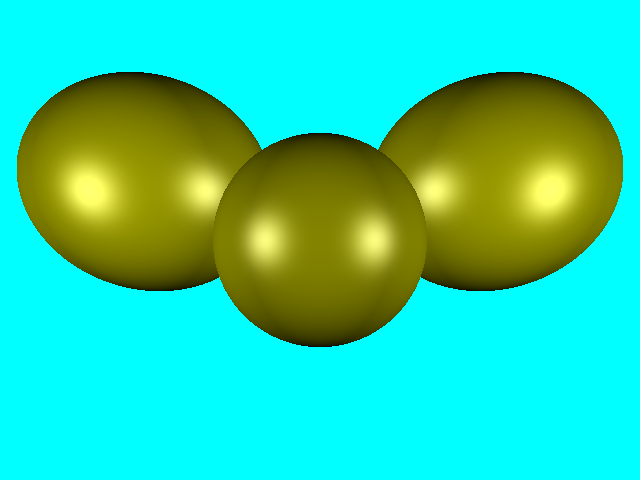
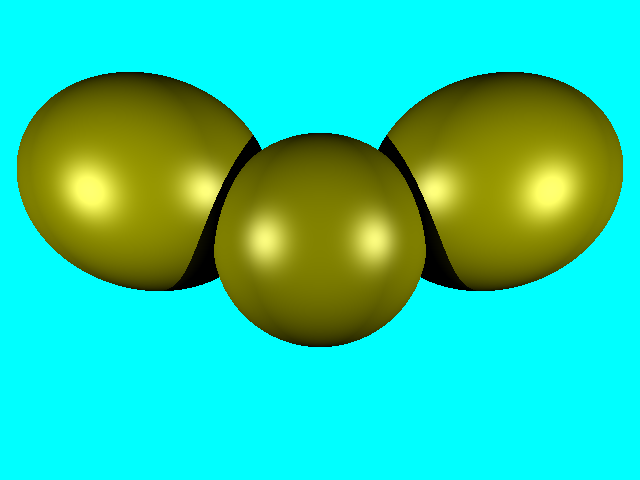 美中不足的是这阴影也太黑了吧! 是时候搬出我们的环境光照啦^_^。
美中不足的是这阴影也太黑了吧!
是时候搬出我们的环境光照啦^_^。
Step 8:环境光照之反射§
添加反射效果很简单。只需要采样反射光线即可。 我们可以复用`ray_tracing`计算出反射光线采样方向,递归采样即可。 注意设置深度,防止无限递归爆掉。这次我依然更改了场景,代码也更改了一些细节,但无关紧要。这里就不提供所有代码了。#include <fstream> #include <array> #include <vector> #include <string> #include <iostream> #include <iomanip> #include <chrono> #include <limits> #include <cmath> #include <omp.h> #include "template.hpp" RGB ray_tracing(Ray &ray, const Scenes &scenes, int depth) { RGB color({0.4, 0.4, 0.3}); Point hit_point; Dir N; if (depth > 15 || !scenes_intersect(ray, scenes, hit_point, N)) { return RGB({0.3, 0.6, 0.8}); } Dir reflect_dir = reflect(-ray.direction, N).normalized(); Ray reflect_ray({(reflect_dir * N < 0 ? hit_point - N * 1e-3 : hit_point + N * 1e-3), reflect_dir, MAX_FLOAT}); RGB reflect_color = ray_tracing(reflect_ray, scenes, depth + 1); float diffuse_light_intensity = 0., specular_light_intensity = 0.; for (auto &light : scenes.lights) { const float light_distance = (light.position - hit_point).magnitude(); const Dir light_dir = (light.position - hit_point).normalized(); Ray shadow_ray({(light_dir * N < 0 ? hit_point - N * 1e-4 : hit_point + N * 1e-4), light_dir, MAX_FLOAT}); Point shadow_hit_point; Dir shadow_N; if (scenes_intersect(shadow_ray, scenes, shadow_hit_point, shadow_N) && shadow_ray.t < light_distance) { continue; } diffuse_light_intensity += light.intensity * std::max(0.f, light_dir * N); specular_light_intensity += light.intensity * powf(std::max(0.f, reflect(light_dir, N) * (-ray.direction)), 50); } return color * diffuse_light_intensity * 0.6 + RGB({1., 1., 1.}) * specular_light_intensity * 0.3 + reflect_color * 0.1; } int main() { auto start = std::chrono::high_resolution_clock::now(); int width = 640, height = 480; std::vector<Sphere> spheres; spheres.push_back(Sphere({Point({-2., 1, -5.}), 1.5})); spheres.push_back(Sphere({Point({2., 1, -5.}), 1.5})); spheres.push_back(Sphere({Point({0., -2, -6.}), 2.})); std::vector<Light> lights; lights.push_back(Light({Point({-5., 0., 1.}), 2.3})); lights.push_back(Light({Point({5., 0., -1.}), 1.7})); lights.push_back(Light({Point({0., 10.5, -5.}), 1.7})); lights.push_back(Light({Point({0.25, 0.75, -6.}), 2.})); Camera camera({Point({0., 0., 0.}), Dir({0., 0., -1.}), 1., static_cast<float>(105. / 180 * PI)}); Scenes scenes; scenes.spheres = spheres; scenes.lights = lights; scenes.camera = camera; auto image = render(scenes, width, height); write(image, "image", "./"); auto end = std::chrono::high_resolution_clock::now(); std::chrono::duration<double> duration = end - start; std::cout << "Time taken: " << duration.count() << " seconds" << std::endl; return 0; }对比一下。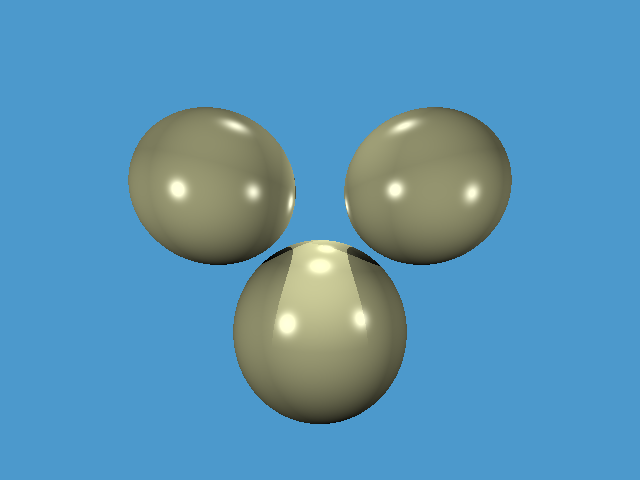
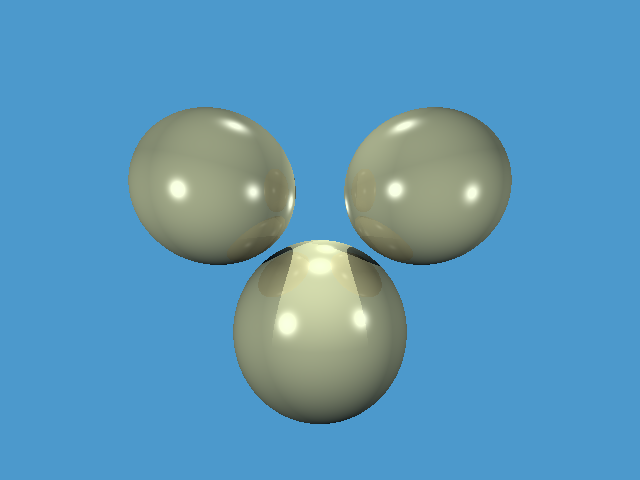
Step 9:环境光照之折射§
折射与反射同理,唯一不同的就是采样光线的方向不一样罢了。 我们用斯涅尔定律来计算出折射光线即可。这里我们添加了新的函数来求解折射光线。#include <fstream> #include <array> #include <vector> #include <string> #include <iostream> #include <iomanip> #include <chrono> #include <limits> #include <cmath> #include <omp.h> #include "template.hpp" Dir refract(const Dir &I, const Dir &N, float refractive_index) { float cosi = -std::max(-1.f, std::min(1.f, I * N)); float etai = 1, etat = refractive_index; Dir n = N; if (cosi < 0) { cosi = -cosi; std::swap(etai, etat); n = -N; } float eta = etai / etat; float k = 1 - eta * eta * (1 - cosi * cosi); return k < 0 ? Dir({0, 0, 0}) : I * eta + n * (eta * cosi - std::sqrt(k)); } RGB ray_tracing(Ray &ray, const Scenes &scenes, int depth) { RGB color({0.6, 0.7, 0.8}); Point hit_point; Dir N; if (depth > 4 || !scenes_intersect(ray, scenes, hit_point, N)) { return RGB({0.3, 0.6, 0.8}); } Dir reflect_dir = reflect(-ray.direction, N).normalized(); Ray reflect_ray({(reflect_dir * N < 0 ? hit_point - N * 1e-3 : hit_point + N * 1e-3), reflect_dir, MAX_FLOAT}); RGB reflect_color = ray_tracing(reflect_ray, scenes, depth + 1); Dir refract_dir = refract(ray.direction, N, 1.5).normalized(); Ray refract_ray({(refract_dir * N < 0 ? hit_point - N * 1e-3 : hit_point + N * 1e-3), refract_dir, MAX_FLOAT}); RGB refract_color = ray_tracing(refract_ray, scenes, depth + 1); float diffuse_light_intensity = 0., specular_light_intensity = 0.; for (auto &light : scenes.lights) { const float light_distance = (light.position - hit_point).magnitude(); const Dir light_dir = (light.position - hit_point).normalized(); Ray shadow_ray({(light_dir * N < 0 ? hit_point - N * 1e-4 : hit_point + N * 1e-4), light_dir, MAX_FLOAT}); Point shadow_hit_point; Dir shadow_N; if (scenes_intersect(shadow_ray, scenes, shadow_hit_point, shadow_N) && shadow_ray.t < light_distance) { continue; } diffuse_light_intensity += light.intensity * std::max(0.f, light_dir * N); specular_light_intensity += light.intensity * powf(std::max(0.f, reflect(light_dir, N) * (-ray.direction)), 125); } return color * diffuse_light_intensity * 0.025 + RGB({1., 1., 1.}) * specular_light_intensity * 0.3 + reflect_color * 0.1 + refract_color * 0.7; } int main() { auto start = std::chrono::high_resolution_clock::now(); int width = 640, height = 480; std::vector<Sphere> spheres; spheres.push_back(Sphere({Point({15., 0, -35.}), 15.})); spheres.push_back(Sphere({Point({-15., 0, -35.}), 15.})); spheres.push_back(Sphere({Point({0., 0, -175.}), 90.})); std::vector<Light> lights; lights.push_back(Light({Point({0., 10.5, -5.}), 1.7})); lights.push_back(Light({Point({0.25, 0.75, -6.}), 2.})); Camera camera({Point({0., 0., 0.}), Dir({0., 0., -1.}), 1., static_cast<float>(105. / 180 * PI)}); Scenes scenes; scenes.spheres = spheres; scenes.lights = lights; scenes.camera = camera; auto image = render(scenes, width, height); write(image, "image", "./"); auto end = std::chrono::high_resolution_clock::now(); std::chrono::duration<double> duration = end - start; std::cout << "Time taken: " << duration.count() << " seconds" << std::endl; return 0; }
Step 10:添加材质§
是时候为物体添加材质属性了,当然我们也会顺手重构一下部分代码。constexpr float MAX_FLOAT = std::numeric_limits<float>::max(); const float PI = 4. * std::atan(1.0); template <typename Type, size_t N> struct Vector { std::array<Type, N> v; Vector() : v() {} Vector(const std::array<Type, N> &v) : v(v) {} Type &operator[](const int i) { return v[i]; } const Type &operator[](const int i) const { return v[i]; } Vector<Type, N> operator+(const Vector<Type, N> &other) const { Vector<Type, N> res; for (int i = 0; i < N; i++) res[i] = v[i] + other[i]; return res; } Vector<Type, N> &operator+=(const Vector<Type, N> &other) { for (int i = 0; i < N; i++) v[i] += other[i]; return *this; } Vector<Type, N> operator-() const { Vector<Type, N> res; for (int i = 0; i < N; i++) res[i] = -v[i]; return res; } Vector<Type, N> operator-(const Vector<Type, N> &other) const { Vector<Type, N> res; for (int i = 0; i < N; i++) res[i] = v[i] - other[i]; return res; } Vector<Type, N> &operator-=(const Vector<Type, N> &other) { for (int i = 0; i < N; i++) v[i] -= other[i]; return *this; } Type operator*(const Vector<Type, N> &other) const { Type res = 0; for (int i = 0; i < N; i++) res += v[i] * other[i]; return res; } Vector<Type, N> operator*(const Type &scalar) const { Vector<Type, N> res; for (int i = 0; i < N; i++) res[i] = v[i] * scalar; return res; } Vector<Type, N> &operator*=(const Type &scalar) { for (int i = 0; i < N; i++) v[i] *= scalar; return *this; } Vector<Type, N> operator/(const Type &scalar) const { Vector<Type, N> res; for (int i = 0; i < N; i++) res[i] = v[i] / scalar; return res; } Vector<Type, N> &operator/=(const Type &scalar) { for (int i = 0; i < N; i++) v[i] /= scalar; return *this; } Vector<Type, 3> cross(const Vector<Type, 3> &other) const { static_assert(N == 3, "Cross product is only defined for 3D vectors."); Vector<Type, 3> res; res[0] = v[1] * other[2] - v[2] * other[1]; res[1] = v[2] * other[0] - v[0] * other[2]; res[2] = v[0] * other[1] - v[1] * other[0]; return res; } Type magnitude() const { Type res = 0; for (int i = 0; i < N; i++) res += v[i] * v[i]; return std::sqrt(res); } Vector<Type, N> normalized() const { return (*this) * (1.f / magnitude()); } friend std::ostream &operator<<(std::ostream &os, const Vector<Type, N> &vector) { os << "("; for (int i = 0; i < N - 1; ++i) os << vector.v[i] << ", "; os << vector.v[N - 1] << ")"; return os; } }; using v3f = Vector<float, 3>; using Point = v3f; using Dir = v3f; using RGB = v3f; enum { K_DIFFUSE, K_SPECULAR, K_SPECULAR_EXPONENT, K_REFLECT, K_REFRACT, K_REFRACTIVE_INDEX, }; struct Material { RGB color; std::array<float, 6> k; }; struct Ray { Point origin; Dir direction; float t; }; struct Flat { std::vector<Point> points; Dir N; }; struct Sphere { Point center; float radius; Material material; bool ray_intersect(Ray &ray) const { v3f L = center - ray.origin; float tca = L * ray.direction; float d2 = L * L - tca * tca; if (d2 > radius * radius) return false; float thc = sqrtf(radius * radius - d2); float t = ray.t; ray.t = tca - thc; float t1 = tca + thc; if (ray.t < 0) ray.t = t1; if (ray.t < 0) { ray.t = t; return false; } return true; } }; struct Light { Point position; float intensity; }; struct Camera { Point position; Dir direction; float dis, fov; }; struct Scenes { std::vector<Flat> flats; std::vector<Sphere> spheres; std::vector<Light> lights; Camera camera; }; void write(const std::vector<std::vector<RGB>> &image, const std::string &filename, const std::string &filepath = "./") { int width = image[0].size(), height = image.size(); std::ofstream ofs(filepath + filename + ".ppm", std::ios::binary); if (!ofs) { std::cerr << "Error opening file for writing!" << std::endl; return; } ofs << "P6\n" << width << " " << height << "\n255\n"; for (size_t j = 0; j < height; ++j) { for (size_t i = 0; i < width; ++i) { RGB rgb = image[j][i]; char r = static_cast<char>(rgb[0] * 255); char g = static_cast<char>(rgb[1] * 255); char b = static_cast<char>(rgb[2] * 255); ofs.write(&r, 1); ofs.write(&g, 1); ofs.write(&b, 1); } } } Dir reflect(const Dir &L, const Dir &N); bool scenes_intersect(Ray &ray, const Scenes &scenes, Point &hit_point, Dir &N); RGB ray_tracing(Ray &ray, const Scenes &scenes, int depth); Dir reflect(const Dir &L, const Dir &N) { return N * 2.f * (L * N) - L; } bool scenes_intersect(Ray &ray, const Scenes &scenes, Point &hit_point, Dir &N, Sphere &hit_sphere) { for (auto &sphere : scenes.spheres) { if (sphere.ray_intersect(ray)) { hit_point = ray.origin + ray.direction.normalized() * ray.t; N = (hit_point - sphere.center).normalized(); hit_sphere = sphere; } } return ray.t < 1000.; } std::vector<std::vector<RGB>> render(Scenes &scenes, int width, int height) { Camera camera = scenes.camera; std::vector<std::vector<RGB>> image(height, std::vector<RGB>(width)); #pragma omp parallel for for (size_t j = 0; j < height; ++j) { for (size_t i = 0; i < width; ++i) { float x = (2. * (i + 0.5) / (float)width - 1) * tan(camera.fov / 2.); float y = -(2. * (j + 0.5) / (float)height - 1) * tan(camera.fov / 2.) * (float)height / (float)width; Dir dir = v3f({x, y, -1}).normalized(); Ray ray({camera.position, dir, MAX_FLOAT}); RGB rgb = ray_tracing(ray, scenes, 0); float max = std::max(rgb[0], std::max(rgb[1], rgb[2])); if (max > 1) rgb /= max; image[j][i] = rgb; } } return image; }#include <fstream> #include <array> #include <vector> #include <string> #include <iostream> #include <iomanip> #include <chrono> #include <limits> #include <cmath> #include <omp.h> #include "template.hpp" Dir refract(const Dir &I, const Dir &N, float refractive_index) { float cosi = -std::max(-1.f, std::min(1.f, I * N)); float etai = 1, etat = refractive_index; Dir n = N; if (cosi < 0) { cosi = -cosi; std::swap(etai, etat); n = -N; } float eta = etai / etat; float k = 1 - eta * eta * (1 - cosi * cosi); return k < 0 ? Dir({0, 0, 0}) : I * eta + n * (eta * cosi - std::sqrt(k)); } RGB ray_tracing(Ray &ray, const Scenes &scenes, int depth) { Point hit_point; Dir N; Sphere hit_sphere; if (depth > 4 || !scenes_intersect(ray, scenes, hit_point, N, hit_sphere)) { return RGB({0.3, 0.6, 0.8}); } Material material = hit_sphere.material; Dir reflect_dir = reflect(-ray.direction, N).normalized(); Ray reflect_ray({(reflect_dir * N < 0 ? hit_point - N * 1e-3 : hit_point + N * 1e-3), reflect_dir, MAX_FLOAT}); RGB reflect_color = ray_tracing(reflect_ray, scenes, depth + 1); Dir refract_dir = refract(ray.direction, N, material.k[K_REFRACTIVE_INDEX]).normalized(); Ray refract_ray({(refract_dir * N < 0 ? hit_point - N * 1e-3 : hit_point + N * 1e-3), refract_dir, MAX_FLOAT}); RGB refract_color = ray_tracing(refract_ray, scenes, depth + 1); float diffuse_light_intensity = 0., specular_light_intensity = 0.; for (auto &light : scenes.lights) { const float light_distance = (light.position - hit_point).magnitude(); const Dir light_dir = (light.position - hit_point).normalized(); Ray shadow_ray({(light_dir * N < 0 ? hit_point - N * 1e-4 : hit_point + N * 1e-4), light_dir, MAX_FLOAT}); Point shadow_hit_point; Dir shadow_N; Sphere shadow_hit_sphere; if (scenes_intersect(shadow_ray, scenes, shadow_hit_point, shadow_N, shadow_hit_sphere) && shadow_ray.t < light_distance) { continue; } diffuse_light_intensity += light.intensity * std::max(0.f, light_dir * N); specular_light_intensity += light.intensity * powf(std::max(0.f, reflect(light_dir, N) * (-ray.direction)), material.k[K_SPECULAR_EXPONENT]); } return material.color * diffuse_light_intensity * material.k[K_DIFFUSE] + RGB({1., 1., 1.}) * specular_light_intensity * material.k[K_SPECULAR] + reflect_color * material.k[K_REFLECT] + refract_color * material.k[K_REFRACT]; } int main() { auto start = std::chrono::high_resolution_clock::now(); int width = 640 * 2, height = 480 * 2; Material ivory({RGB({0.4, 0.4, 0.3}), {0.6, 0.3, 50., 0.1, 0.0, 1.0}}); Material glass({RGB({0.6, 0.7, 0.8}), {0.025, 0.5, 125., 0.1, 0.8, 1.5}}); Material mirror({RGB({1.0, 1.0, 1.0}), {0., 10, 1425., 0.8, 0., 1.}}); std::vector<Sphere> spheres; spheres.push_back(Sphere({Point({15., 0, -35.}), 15., ivory})); spheres.push_back(Sphere({Point({-15., 0, -35.}), 15., ivory})); spheres.push_back(Sphere({Point({0., -15, -30.}), 5., mirror})); spheres.push_back(Sphere({Point({0., 0, -15.}), 5., glass})); std::vector<Light> lights; lights.push_back(Light({Point({0., 0., 0.}), 4.})); lights.push_back(Light({Point({0., 0., -35.}), 2.})); Camera camera({Point({0., 0., 0.}), Dir({0., 0., -1.}), 1., static_cast<float>(105. / 180 * PI)}); Scenes scenes; scenes.spheres = spheres; scenes.lights = lights; scenes.camera = camera; auto image = render(scenes, width, height); write(image, "image", "./"); auto end = std::chrono::high_resolution_clock::now(); std::chrono::duration<double> duration = end - start; std::cout << "Time taken: " << duration.count() << " seconds" << std::endl; return 0; }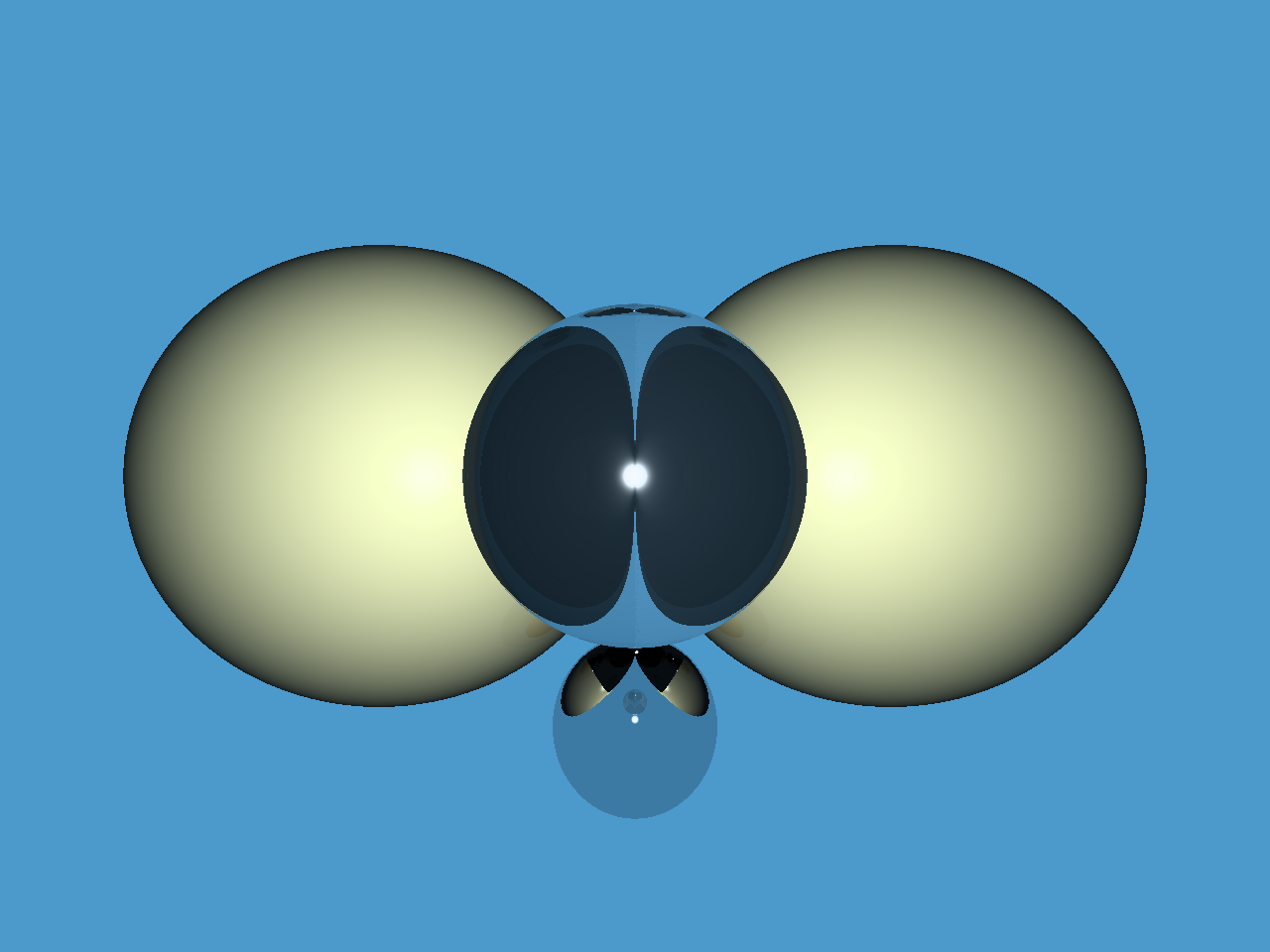
总结§
说实话,有些遗憾,大家会看到我代码里有不少坑还没补,比如我们原先是希望可以变更摄像机位置,而且除了球体我们还想做平面的渲染。
但我想先就此打住了,尽管渲染的画面确实算可以了,但仔细看瑕疵真的很大,你会发现阴影的显示,光源的照射效果都有些失真。显然是我们代码模拟不够准确。
但值得欣慰的是,哪怕代码里有些许错误,我们确实实现了光线追踪的基本过程。
因此,就让我们结束这段学习吧。 现在该去挑战真正的图形学啦^_^。